La Casa

An Active Adult Resident Owned Community

  • Home
  • Welcome
    • Welcome to La Casa
    • Homes For Sale
    • Video
    • History of La Casa
    • Questions and Answers for Visitors and Prospective Owners
    • Directions
  • Homeowners Assoc.
    • Homeowners Association
      • HOA Mtgs: Zoom Info
    • Park Manager
    • Rules & Other Documents
    • Standing Committees
    • Meet the Park Employees of La Casa
  • Activity Assoc.
    • Activity Association
    • Activities
    • Card Games
    • Clubs
    • Other Functions
    • All Star Show
    • Dances
  • Calendar & Events
    • Calendar
    • Events & Notices
    • Weekly Events
  • Contacts & Resources
    • Hurricane Ian Resources
    • Directory
    • HELP Dispatchers and Coordinator
    • La Casa Newsletter
    • Forms
      • All Forms
      • Security Incident Form
      • Events & Notices Request
      • La Casa Facilities Request
      • Resident Communication Form
    • Resources
    • FAQs
    • Contact Us
  • Login
    • Login
    • Registration
    • Subscribe
    • Terms and Conditions / Privacy Statement
  • Search
You are here: Home / Editor's Blog / Problems Logging in ? Here is How To Solve Them

Problems Logging in ? Here is How To Solve Them

November 26, 2014 by La Casa Webmaster

If you are having problems logging in to lacasaroc.com then your first step should be to verify your user name and email address.

You can do that by emailing hoalacasa@gmail.com and just say that your are having problems logging in to the resident site.

Someone on the website committee will verify the exact user name and email address that was used when you originally registered.

That information will then be emailed to you.

If you still cannot log in using this information then follow the procedure below to reset your password.

Go to the top menu on the lacasaroc.com home page and click on the LOG IN button, it should look like this

 

top menue


Once you click the LOG IN button you will be taken to the Log in page which looks like this.
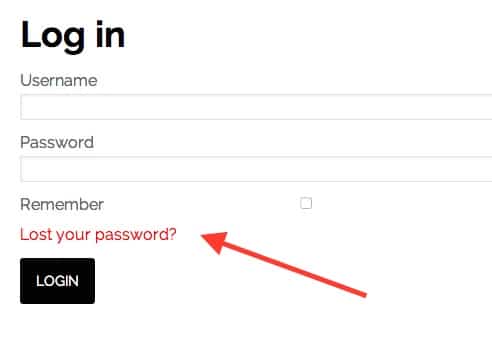
see the red arrow


Click on the “Lost your password” shown in red and you will be taken to a form which looks like this
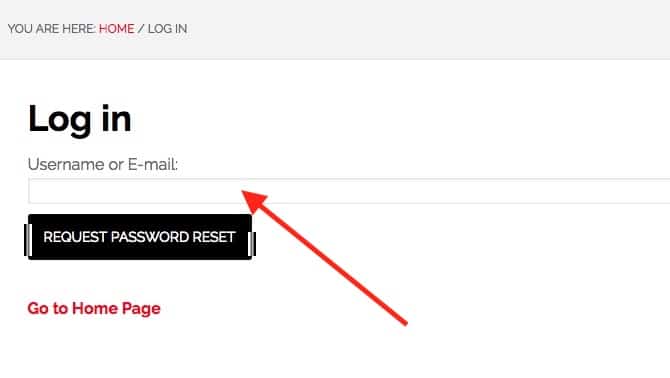
 

Enter your user name or email address and you will received an email which will help you reset your password and it will look like this.
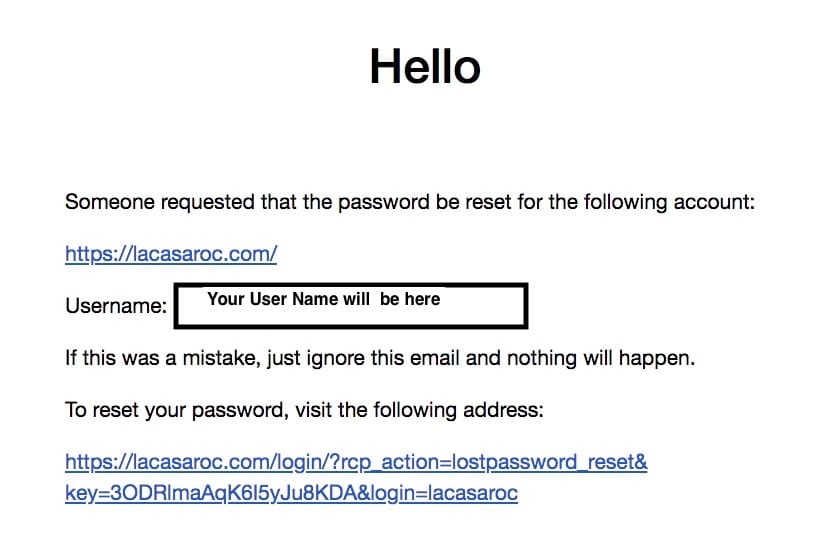


Click the link at the bottom of the email and you will be taken to yet another form on which you will enter a new password of your choosing.

Its a good idea to write down the password you select.  The following form has some good suggestions on selecting a password that is secure.
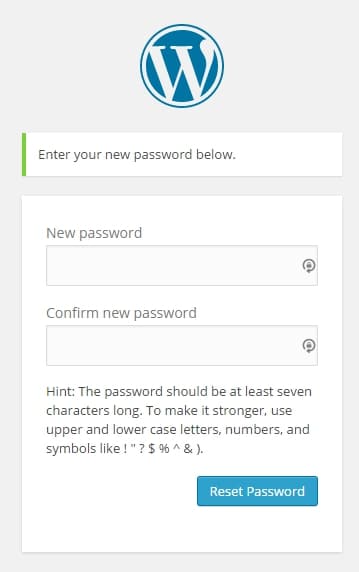
final image


If you are still having problems write to hoalacasa@gmail.com and we will work with you one on one to solve the problem.


Thanks

Filed Under: Editor's Blog, How to

Log In Here

If you are a La Casa resident and have not registered with the site, do so Here. If you are registered, please log in to access all site content.

Lost your password?

Search by Category

Word Search of La Casa ROC

Editor’s Blog – News From the Site

… [Read More...]

theif

Visit our Scam Awareness Page! … [Read More...]

… [Read More...]

More Posts from this Category

Copyright © 2026 · News Pro Theme on Genesis Framework · WordPress · Log in

Loading Comments...

You must be logged in to post a comment.